

When you buy an iPhone, one of the problems everyone will experience at some point is how to apply the screen protector. One of the most annoying things is the air bubbles that form when you apply the screen protector. Once air bubbles appear, you'll want to reapply the screen protector multiple times, but doing it repeatedly can let in dust and ruin the screen protector. You definitely want to avoid wasting your precious screen protector.
🎟 Special Discount Now 🎟
Get 10% off with our special code!
✅ Copied!
So, this time, we'll be introducing detailed tips on how to apply a tempered glass film for the iPhone 16 neatly and with zero bubbles. By reading this article to the end, you'll know how to apply the film smoothly without having to worry about air bubbles!

How to apply without bubbles
For example, many people encounter problems with air bubbles when applying tempered glass film. However, with the right method and tools, you can achieve a clean application without air bubbles. Follow the steps below to ensure a perfect application.
Advance preparation
Smartphone Screen Cleaner
Glass Protective Film
Dust remover (dust removal sticker)
Tissue or soft cloth
Step 1: Thoroughly clean your screen
First, remove your phone from its protective case and use a professional cleaning cloth to thoroughly wipe the screen, making sure there's no dust or fingerprints left behind.
Step 2: Apply the film slowly and carefully
Peel back a corner of the screen protector slightly and carefully align the film to the screen. Once you've found the right position, slowly peel off the backing paper and apply the film little by little, using light pressure with your hand. Be careful not to peel it all off at once. This will help prevent air bubbles from forming.
Step 3: Squeeze out any air bubbles
While applying the film, use a credit card or the included card to gently push any air bubbles out from the edges of the film. Gently pushing the film open will help push the air bubbles out of the screen.
Following this procedure will ensure a beautiful, bubble-free application. The key is to be careful when using tools. However, depending on the shape of your smartphone and the condition of the film, unexpected bubbles may appear. Read on to find out what to do if this happens.
How to remove bubbles
If air bubbles appear after applying the film, there are three ways to resolve the issue:
- Squeeze out any air bubbles with a cotton swab
If air gets trapped between the film and the screen and bubbles form, don't panic. Use a soft cotton swab to push the bubbles out to the edges. Be careful not to press with a hard object, as this may damage the film.
- Fixing bubbles on the edges
If air bubbles form at the edge of the film, peel the edge of the film slightly and slowly lift it up to a bubble-free area. Then, press down with your fingers while re-applying the film, and the bubbles may disappear.
- Remove dust
If the bubbles still persist, it may be due to dust on the film or screen. Peel off the film and spray a little alcohol on the bubble area (do not let it dry completely). Then, use tape to remove the dust from the film, and reapply the film while pressing out the bubbles. This should remove the bubbles.
These additional methods can easily solve the problem of bubbles, but the most important thing is to be careful and patient.
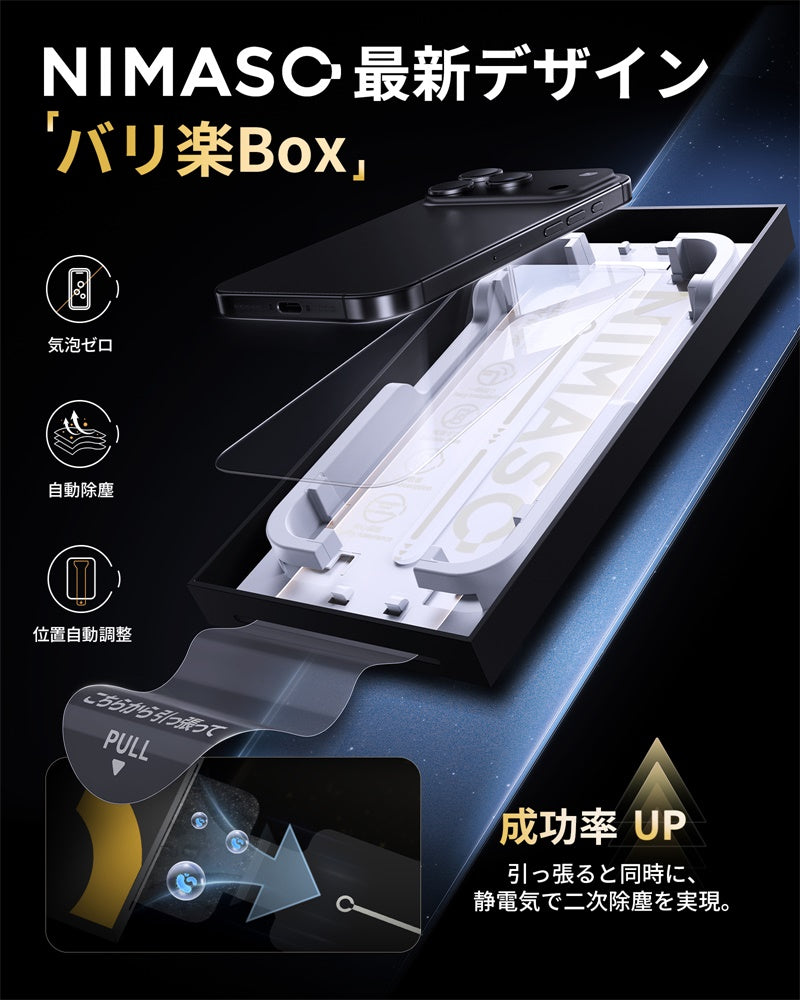
NIMASO Gorilla Glass Screen Protector for iPhone 17/Pro/Pro Max/Air (Bari-Raku Box) with 9H Hardness and Automatic Dust Removal Guide Frame (2 Screens)
[Easy-to-apply box - anyone can apply it easily] Dust and air bubbles are automatically removed when applying the film, so even those who are not good at applying films can easily apply the film.
Preparation to prevent air bubbles
You can prevent air bubbles from forming by taking some precautions before applying the film.
- Use high-quality film
Choose a film from a reputable brand, such as NIMASO. High-quality film is well-made and less likely to have air bubbles.
- Check the compatibility of the smartphone case and film
Some screen protectors have wide edges that may interfere with your phone case. Before applying the screen protector, make sure the case does not press down on the screen protector.
- Gently wipe the screen
It's important to thoroughly clean your phone's screen before applying the film, as any dust or dirt left behind can cause bubbles.
- Work in the right environment
Ideally, work in a room with moderate temperature and dry air. Extreme temperatures and humidity can make the film difficult to apply and can cause bubbles to form.
- Apply it the right way
When applying the film, it is important to do so slowly and carefully, and to align it properly. If you don't apply it properly the first time, it will be easier for dust to get in when you try to reapply it.
By keeping these points in mind and preparing, you can ensure that the film is applied without any bubbles. Taking precautions in advance is the key to success.
What happens if you don't put a film on your iPhone 16?
The iPhone 16 uses Ceramic Shield technology, which makes it more durable than previous models, but it still doesn't completely protect against drops and other accidents. Several drop tests have shown that the iPhone 16 is at risk of damage when dropped, and it requires careful handling even during everyday use. Failure to apply a screen protector exposes the phone to the following risks:
- The screen becomes more susceptible to cracking
Although Ceramic Shield is strong, it's not completely shatterproof, and the screen may crack if dropped, especially on a corner or hit against a hard surface.
- Easy to scratch
When you put your smartphone in a bag or pocket, it may come into contact with keys or hard objects, causing small scratches. This can make the screen look bad and make it difficult to read.
- Reduced screen lifespan
Without a film, your screen will deteriorate faster due to direct wear and impact. Without screen protection, you risk needing repair or replacement, especially if you plan to use your phone for a long time.
- Fingerprints and dirt easily appear
Many screen protectors have anti-fingerprint coatings, so if you don't apply one, fingerprints and oils will easily remain on the screen, requiring you to wipe them off frequently.
To maximize the durability of your iPhone 16, we highly recommend using a screen protector and a protective case. This will help protect your phone from accidental drops and everyday scratches.
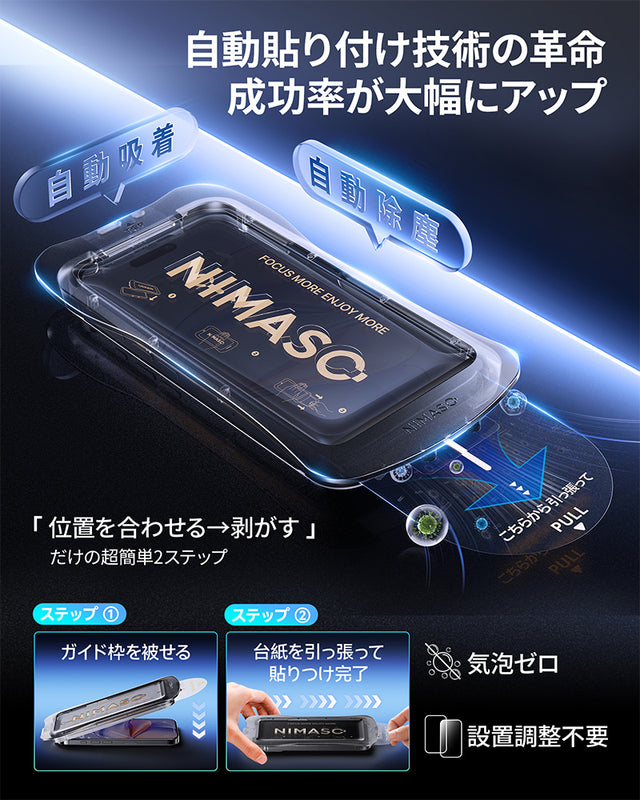
NIMASO Tempered Glass Film for iPhone 17/Pro/Pro Max/Air with Automatic Dust Removal Guide Frame (2-Pack)
[Highly sensitive touch, 99% transmittance] The ultra-thin film of approximately 0.33 mm maintains high touch sensitivity while minimizing discomfort when worn.
NIMASO Tempered Glass Film Recommendations
Choosing a high-quality film is important to protect your iPhone 16. NIMASO products are essential, especially for those looking for a clean, bubble-free finish and long-term durability. This time, we'll introduce you to NIMASO's tempered glass film designed specifically for the iPhone 16. This film combines excellent protection with ease of use, making it easy for anyone to achieve a perfect finish.
NIMASO iPhone 16 "Bari-Raku Box" Anti-Glare Tempered Glass Film with Black Edge and Guide Frame (Set of 2)

For those who want to thoroughly protect their iPhone 16, we recommend NIMASO's "Bari-Raku Box" anti-glare tempered glass film . This film is popular with many users for its excellent visibility and protection, as well as its easy application. The set also includes a comprehensive set of tools for a clean application.
Anti-reflection and anti-glare function
This NIMASO film features a unique anti-reflective coating that significantly reduces reflections from sunlight and fluorescent lights. This means you can view your iPhone 16 screen for long periods of time without straining your eyes, making it comfortable to use outdoors. Improved visibility also reduces eye strain and helps protect your eye health.
Smooth touch and fingerprint-resistant
NIMASO uses nano-etching technology, creating an incredibly smooth surface that feels smoother to the touch than standard glass screen protectors. It's also ideal for gaming enthusiasts. Additionally, its AF (Anti-Fingerprint) coating makes it resistant to fingerprints and smudges, and even if they do appear, they can be easily wiped clean. This ensures a clean, smooth experience.
Anyone can easily apply it with the Bari Raku Box
NIMASO's "Bari-Raku Box" is an innovative system that even those who are not good at applying screen protectors can use with confidence. Using the guide frame, you can precisely align the screen protector perfectly to the iPhone 16 screen, making it easy for anyone to apply the screen protector. Furthermore, it automatically removes dust during application, ensuring virtually no air bubbles and a beautiful finish.
9H hardness for excellent impact resistance
This tempered glass screen protector boasts a surface hardness of 9H, making it scratch-resistant even when it comes into contact with keys or other sharp objects in your bag. It provides excellent protection for your iPhone 16 screen, and its shatterproof design means that even if the screen protector does break, glass shards will not scatter, ensuring a high level of safety.
Set contents
- Tempered glass film x 2
- Guide frame x 1
- Anti-slip mat x 1
- 2 x alcohol pads
- Cleaning cloth x 2
- Dust removal stickers x 2
- Instruction manual x 1
By using this NIMASO tempered glass film, you can minimize the risk of air bubbles and thoroughly protect your iPhone 16. NIMASO also offers blue light blocking tempered glass film with a "Bari-Raku Box" and blue light blocking tempered glass film , which can effectively protect your smartphone while reducing eye strain.
Can I use an iPhone 15 screen protector on an iPhone 16?
In conclusion, it is possible to use a screen protector designed for the iPhone 15 on the iPhone 16. Because the screen sizes and shapes of the iPhone 16 and iPhone 15 are very similar, screen protectors are often compatible. However, to ensure a perfect fit, it's important to choose a screen protector that clearly states it's "compatible with the iPhone 16" when purchasing. In particular, since the camera and sensor positions may be slightly different, we recommend checking the seller's instructions to ensure the screen protector is fully compatible with the latest model.
summary
Applying a tempered glass screen protector for your iPhone 16 without any bubbles requires the proper method and tools. NIMASO 's screen protectors are easy to apply and offer excellent protection. The "Bari-Raku Box" and screen protectors with blue light blocking are especially ideal for those looking for both ease of use and eye protection. If you're having trouble choosing a screen protector, consider NIMASO's products.


